


The Birchfeed CLI
Category: SciTech
Share
Archive
Like
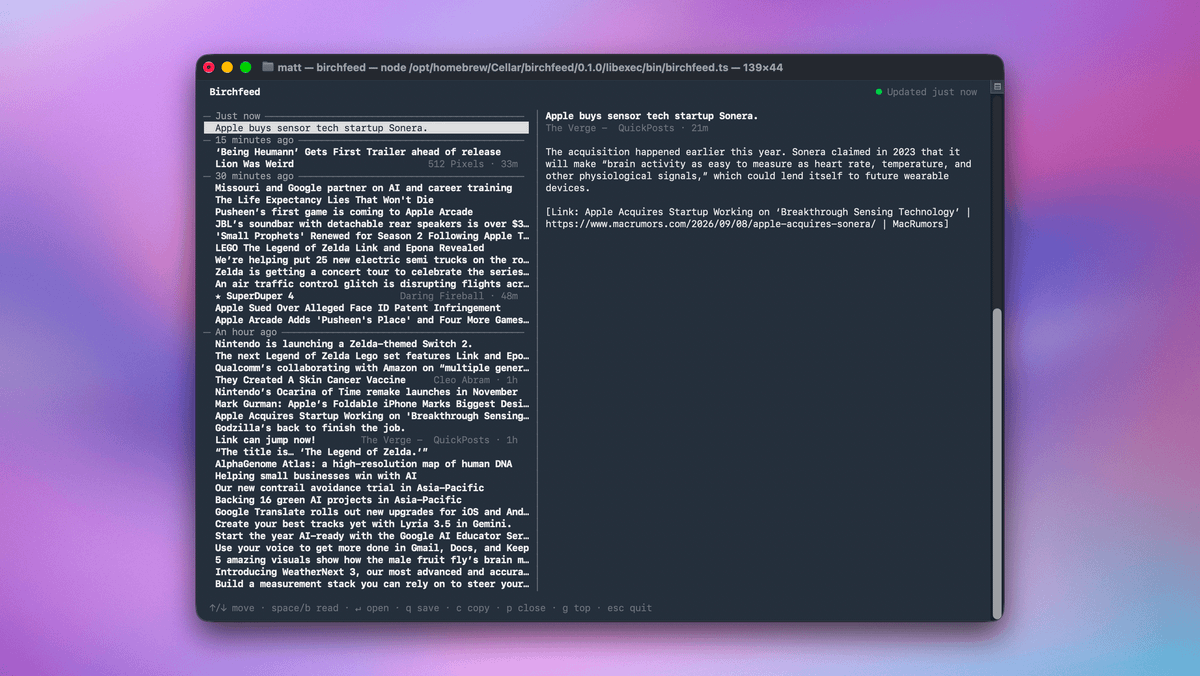
One of the things I love in Birchfeed, my RSS sync service is the news stream feature. This lets you open up a window with new stories streaming into the view as they come in. It's pretty slick, and I use it on big news days (like tomorrow, for example).
Because I know a lot of nerds use the service, I also wanted to point out that there is a CLI you can use as well. You can install it with Homebrew: brew install mattbirchler/tap/birchfeed
And you can call it as simply as entering birchfeed in your terminal of choice. You will want to run birchfeed auth the first time, paste in an API key you generated from Birchfeed itself, and then you will be good to go.
There are keyboard shortcuts listed at the bottom of the window, so you can figure this out, but you can choose whether you see article content itself in a pane on the right or if you just want to see a list of headlines. Arrow through them and hit return to open it in your browser, press c to copy the link to your clipboard, and if you have a Quick Reads account set up, press q to instantly save it to your reading queue.
Obviously, I know this is a niche feature, but hey, Birchfeed is built for RSS obsessives, so I know some people will get value from it.
A note on cookies
Newshunt uses essential cookies to keep you signed in and to remember your language and country, so the site works the way you expect. With your permission, we'd also like to use analytics cookies to understand how people use Newshunt and improve it over time.
Accepting only affects analytics. To learn more, view our Privacy Policy or Terms & Conditions.
(0)Comments