


How Much Dash Cam Footage Can a 32GB Card Hold?
Category: Business
Share
Archive
Like
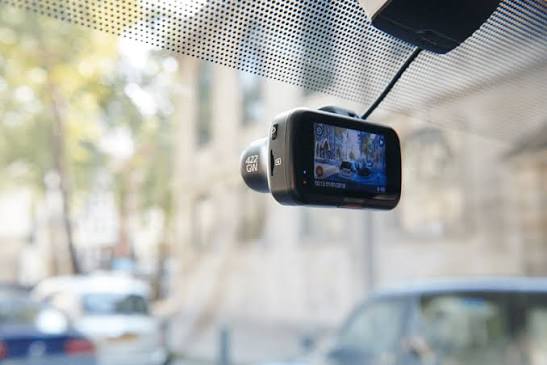
A dash cam only earns its place on the windscreen if the footage is still there when you need it. Whether it's a near miss on the motorway or a scrape in a supermarket car park, the clip that matters lives on a tiny memory card, and most drivers have no idea how much it can actually store. So how much dash cam footage can a 32GB card hold?
About 280 minutes of 1080p or 140 minutes of 1440p, according to Nextbase's figures for a front camera. Add a rear camera, and that falls to roughly 200 and 115 minutes. Older clips are then overwritten.
Those numbers only tell half the story, though. Locked incident files, parking mode, and your card choice all affect how much usable history you really have, and a few settings can make the difference between keeping the crucial clip and losing it. What Those Numbers Mean on Real Journeys
Nextbase, one of the UK's best-known dash cam brands, publishes recording time estimates for each card size. On a 32GB card, it puts front-camera recording at around 280 minutes in 1080p, 140 minutes in 1440p and just 80 minutes in 4K. With a rear camera recording at 720p as well, those figures drop to about 200, 115 and 60 minutes, respectively.
That sounds limiting until you remember how dash cams work. Virtually all of them use loop recording, saving footage in short segments and quietly overwriting the oldest ones once the card is full. The camera never stops recording; the card simply holds a rolling window of your most recent driving.
For a typical commuter covering an hour or so a day, 32GB of 1080p footage covers several days of driving. You usually notice anything that happens within minutes, which is when the important clip gets saved. Why Locked Files Eat Into Your Storage
Most dash cams include a G-sensor that detects sudden impacts and automatically locks the current clip so it can't be overwritten. Many also have a manual button to protect footage on demand. That's exactly what you want after an incident, but locked files sit outside the loop and take up space until you delete them.
Set the G-sensor too sensitively, and every pothole, speed bump and kerb clip triggers a lock. Over a few weeks, those files can fill the card, leaving little room for normal recording, and some cameras will stop recording altogether with a card-full warning. A medium sensitivity setting suits most UK roads, and clearing out old locked clips every few weeks keeps the loop healthy. Parking Mode Changes the Maths
Parking mode lets a dash cam keep watch while the car is parked, typically waking up to record when it detects motion or a bump. It's a useful extra in busy car parks, but every event it captures uses space on the same card.
If you rely on parking mode, factor that extra footage into your storage plans. A camera that records several parking events a day on top of daily driving will cycle through a 32GB card faster than one used only on the move. Why a Standard Card Is the Wrong Choice
Dash cams are tough on memory cards. They write data constantly, often in a hot summer car or a freezing winter one, and ordinary cards aren't built for that workload. When they wear out, they often fail silently, and you only discover the problem when you go looking for footage.
That's why manufacturers stress card quality. Nextbase recommends formatting the card in the camera at least once a month, after saving anything you want to keep, and warns that incompatible cards can cause the camera to freeze or stop recording. A U3-rated card is a sensible minimum, and high-endurance cards designed for continuous recording are the better long-term choice.
For businesses managing vans, taxis, or company cars, standardising on a single card type simplifies fleet operations. Sourcing high-endurance 32GB microSD cards in volume helps operators keep spares on hand and rotate media before hardware wear sets in. When evaluating options, key factors include brand reliability, speed ratings, and required volume, with resources such as https://bulkmemorycards.com/product-category/microsd-cards/microsd-32gb/ offering a useful reference for fleet replacement stock. When 32GB Isn't Enough
Some cases call for a bigger card. If you record in 4K, run front and rear cameras together or spend long days on the road as a delivery or taxi driver, 32GB can cycle through in a single shift. That means less history to fall back on if you don't notice an incident right away.
In those situations, 64GB or 128GB gives you more breathing room, provided your camera supports the larger size. Check the manual first, as some older and budget models cap the maximum supported capacity. Getting the Important Clip Off the Card
Capturing an incident is only half the job. The other half is getting the footage somewhere safe before it's overwritten or the card fails. Many modern dash cams pair with a smartphone app over Wi-Fi, which makes it easy to download a clip at the roadside. Older models require you to remove the card and read it on a computer.
Either way, save the original, unedited file as soon as you can, and keep a second copy somewhere other than the card itself. If you need to share footage with an insurer or the police, an untouched original with its date and time stamp intact is far more useful than a trimmed clip or a phone recording of the camera's screen. Also check that the camera's date and time are set correctly, as some models reset them after a firmware update. Check Your Settings Before Your Next Drive
Open your dash cam's menu and check three things: recording resolution, G-sensor sensitivity and when the card was last formatted. If any of them are still on the default settings from when you fitted the camera, five minutes of tweaking now could save the one clip you'll really need later.
A note on cookies
Newshunt uses essential cookies to keep you signed in and to remember your language and country, so the site works the way you expect. With your permission, we'd also like to use analytics cookies to understand how people use Newshunt and improve it over time.
Accepting only affects analytics. To learn more, view our Privacy Policy or Terms & Conditions.
(0)Comments