


53,640 Salesforce Files, 770 HubSpot Tickets, and One Migration Lesson
Category: SciTech
Share
Archive
Like
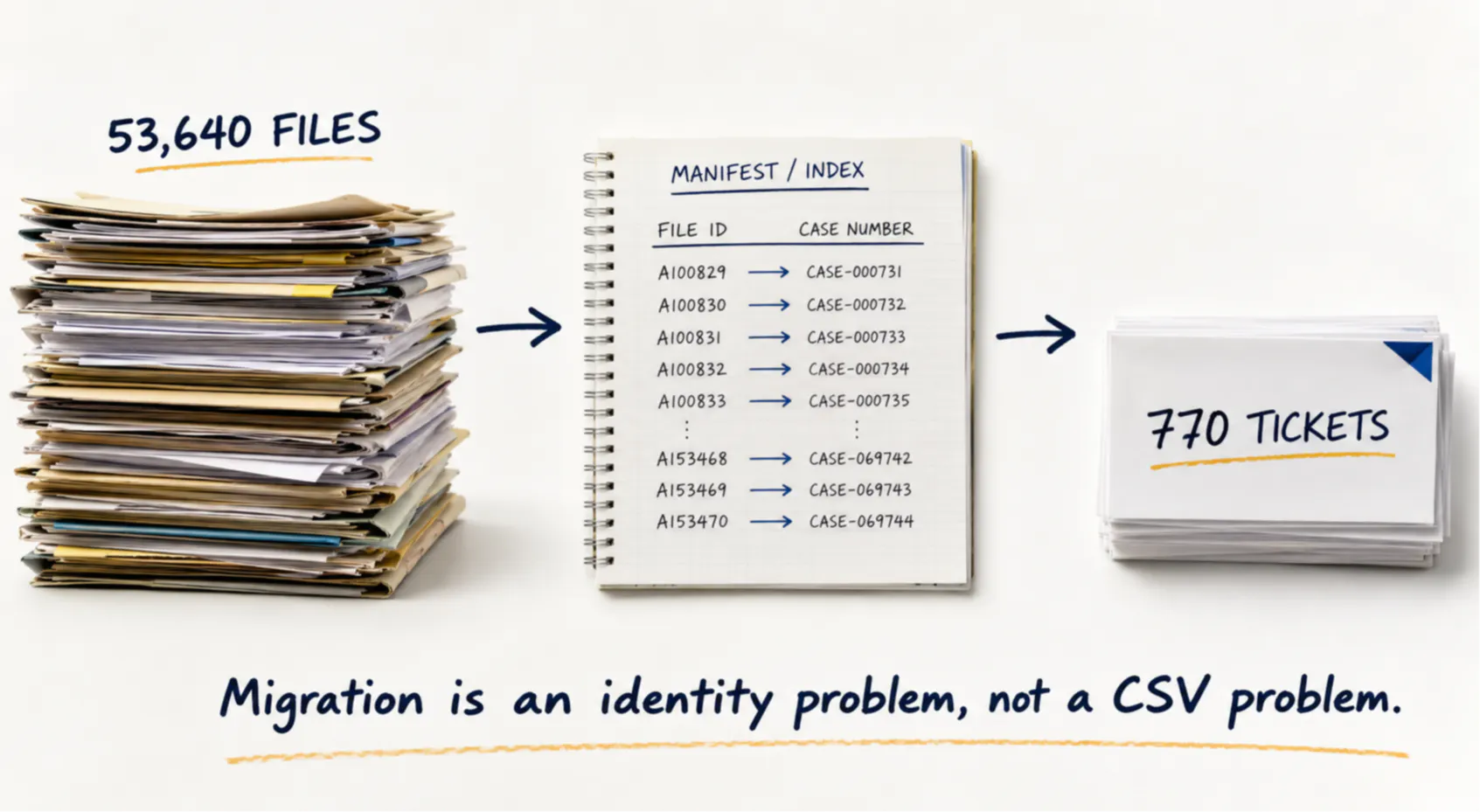
I went into a Salesforce-to-HubSpot migration expecting schema mapping and CSV cleanup to be the difficult parts. They weren't. The harder problem appeared when we reached historical support data: 53,640 case-related files had to remain understandable and traceable, while only 770 corresponding support tickets existed in the destination at that stage of the migration.
A CSV can move properties. It does not automatically preserve the relationship between a record, its attachments, the physical files in an export, and the object that represents that record in another platform.
The solution was to stop treating the files as a pile of attachments and build an explicit identity layer first: source case number → source record → exported file → destination ticket.
That manifest became the control plane for the rest of the migration.
I Thought the CSVs Would Be the Hard Part
The migration started as most CRM migrations do.
Inventory the Salesforce objects. Decide what still matters. Clean the data. Map the fields. Import the records into the destination.
Accounts, contacts, leads and other structured objects are tedious, but they are understandable. You can open a CSV and inspect what you have.
Historical support cases were different. The Salesforce export arrived across multiple archives. Alongside the structured CSV data were thousands of physical files associated with historical cases.
By the time I finished the inventory, there were 53,640 case files.
At the destination, the current migration scope contained 770 HubSpot tickets.
That immediately changed the problem: I did not need to blindly move 53,640 files. I needed to answer three questions for every file:
That is not a CSV-import problem. It is an identity-mapping problem.
Salesforce Exports Preserve the Data, but Not Necessarily the Human Context
One thing that surprised me during the export work was how different a backup-oriented representation can be from something a human would want to browse.
Salesforce's own documentation describes this behavior for exported attachments: physical attachment files can be exported using their Salesforce IDs rather than their original filenames, while the accompanying metadata CSV is needed to determine the original name and file type.
That makes perfect sense for a system export.
It is not convenient when somebody needs to open the archive six months later and answer:
A directory containing files such as:
may be technically complete.
It is not operationally useful. The export therefore needed a transformation layer. But I did not want to simply rename everything and throw away the Salesforce IDs. Those IDs were part of the evidence I needed to prove where each file came from.
So I kept both.
The Manifest Became More Important Than the Files
Before uploading anything to HubSpot, I created a normalized manifest.
Conceptually, each row looked like this:
For example:
The exact columns can vary, but the important idea is simple:
Do not make the destination API responsible for reconstructing your source-system relationships.
Resolve those relationships before migration. Once I had the manifest, I could answer basic questions without querying either CRM:
That last question matters more than it sounds.
Empty Cases Should Still Exist in the Migration Structure
My first instinct was to create folders only for cases that had files.
That creates an ambiguity. Suppose case 001234 doesn't have a directory.
Does that mean:
There is no way to know from the filesystem alone. Instead, I created the case structure for every in-scope case.
Something like:
An empty Files directory now has meaning:
That is much better than absence. I also generated a small summary for each case containing useful source information such as the subject and description.
This wasn't required by HubSpot. It was useful for humans. A migration should not only produce data the destination application can ingest. It should leave behind an archive that another engineer can understand without reverse-engineering the migration script.
Cross-System Identity Was the Real Design Decision
The next decision was deciding what identifier should survive the move.
Salesforce has internal record IDs. HubSpot has its own record IDs.
Those are useful inside each platform, but neither ID means anything to the other system. For the support migration, the useful business identifier was the case number.
That gave me a stable bridge:
In the destination, the source case number can be stored in a ticket property and used during migration to resolve the corresponding HubSpot record.
HubSpot currently supports using a record ID or a custom property that requires unique values as an identifier when importing or updating tickets. That is exactly the kind of capability I want in a migration. The destination should have its own native record ID, but it should also retain the durable identifier from the source system. Without that bridge, troubleshooting becomes painful.
You eventually end up asking questions such as:
That information should not exist only inside a migration script that ran once.
Don't Search 53,640 Files for Every Ticket
There was another implementation mistake that was easy to make.
A straightforward migration loop might look conceptually like this:
It works. It is also the wrong shape. The source files should be indexed once.
A simplified Python version looks like this:
The important part isn't Python.
It is the data structure.
Instead of repeatedly scanning the export, build:
and:
Then migration becomes a lookup problem.
That also lets you immediately identify:
Those are the exceptions I want to know about before making thousands of API calls.
Filter Before You Upload
This became particularly important because the numbers were asymmetric.
There were 53,640 case-related files in the source material, but the destination currently contained only 770 tickets in scope.
Scanning or uploading everything first would waste work.
Instead, the destination ticket mapping became a filter.
Conceptually:
The difference is subtle but important:
Start from the migration scope, not from the pile of data.
That principle applies far beyond CRM migrations.
Uploading a File Is Not the Same as Attaching It to a Ticket
The HubSpot side introduced another useful distinction.
Uploading a file creates a file in HubSpot's file system.
That alone does not mean the file appears as an attachment on the correct CRM ticket.
HubSpot's current Files API documentation describes the record-attachment flow as two steps:
This matters architecturally.
There are multiple identities involved:
If I logged only "upload succeeded," I would not know whether the attachment actually reached the correct ticket timeline.
So migration status needs to capture more than HTTP 200 versus error.
Now I can reconcile the migration.
Make the Migration Restartable
A migration script that works once is useful.
A migration script that can be safely restarted is much more useful.
With tens of thousands of files, I assume something will eventually interrupt the process:
If the script has no persistent state, restarting may create duplicates or force you to begin again.
The manifest can also serve as a migration ledger:
After each successful attachment, persist the destination IDs.
Then a rerun can start with:
For a production implementation, I would also store the error response and retry count rather than only a single status string. The goal is idempotency.
A migration should be designed with the assumption that it will stop halfway through.
Preserve Evidence Before Optimizing
One mistake I tried to avoid throughout the project was optimizing the data too early.
It is tempting to:
Those transformations may eventually make sense. But before changing the source representation, preserve enough information to reconstruct where everything came from.
My rule became:
That meant keeping the original Salesforce IDs in the manifest even after generating human-readable filenames and folders.
If two attachments have the same original name, the source ID still distinguishes them. If a migration result looks wrong later, the manifest provides a path back to the original export.
The Architecture I Would Use Again
If I had to run another CRM file migration tomorrow, I would separate it into these stages:
The important thing is that upload comes relatively late.
By the time a file reaches the API, I want to already know:
The Bigger Lesson
CRM migrations are often described as field-mapping projects. That description works until the data stops being rectangular.
Attachments, historical cases, emails, documents and relationships expose the actual problem: migration is about preserving identity and context while the storage model changes underneath you.
CSV is excellent at representing rows.
It cannot, by itself, answer:
Once I treated that as the core problem, the architecture became much clearer. The 53,640 files were no longer 53,640 individual migration decisions. They were rows in a deterministic mapping system.
And the manifest—not the upload script—became the most important artifact in the project.
A note on cookies
Newshunt uses essential cookies to keep you signed in and to remember your language and country, so the site works the way you expect. With your permission, we'd also like to use analytics cookies to understand how people use Newshunt and improve it over time.
Accepting only affects analytics. To learn more, view our Privacy Policy or Terms & Conditions.
(0)Comments